Agentic AI for Nonprofits: A Guide to Safe Internal Delegation
For fifteen years, CareerVillage has used technology to help millions of learners access career navigation support. From experience, we know that effectively scaling impact through technology requires a robust approach to safe and responsible adoption. That principle is what led us to formalize how our own team uses AI agents internally.
Over the past year, we've built and continue to improve a working system for delegating real operational tasks to AI agents: consolidating product feedback, researching partnership leads, synthesizing documentation, even building internal tools. We call each of these a play: a task that's been reviewed, risk-classified, and approved for agentic use. None of these happened by accident. Each of these plays came from a deliberate process of identifying where an agent could genuinely help, defining what success looked like, and building in the right level of human oversight.
What follows is a practical look at how we approach this work: the framework we use to decide whether a task or workflow is a good candidate for agent delegation, how we classify risk and build in human review, and five use cases with examples of real plays we've put into practice.
Why we’re sharing this
AI agents are best suited for work that's repetitive, well-defined, and time-consuming, tasks where the steps rarely change and success can be clearly measured. That description fits a lot of the operational work nonprofits handle every day.
It also lines up well with a challenge most nonprofits know firsthand: limited capacity. Used well, agents can take on repetitive parts of a workflow so staff can spend more time on strategy, creative work, building relationships, and professional development.
We're sharing that process here because we know that other nonprofits are also actively considering whether and how to leverage agents, and we believe we have some useful insights to share for those that are moving closer to experimentation.
How we identify, decide, and evaluate agent use
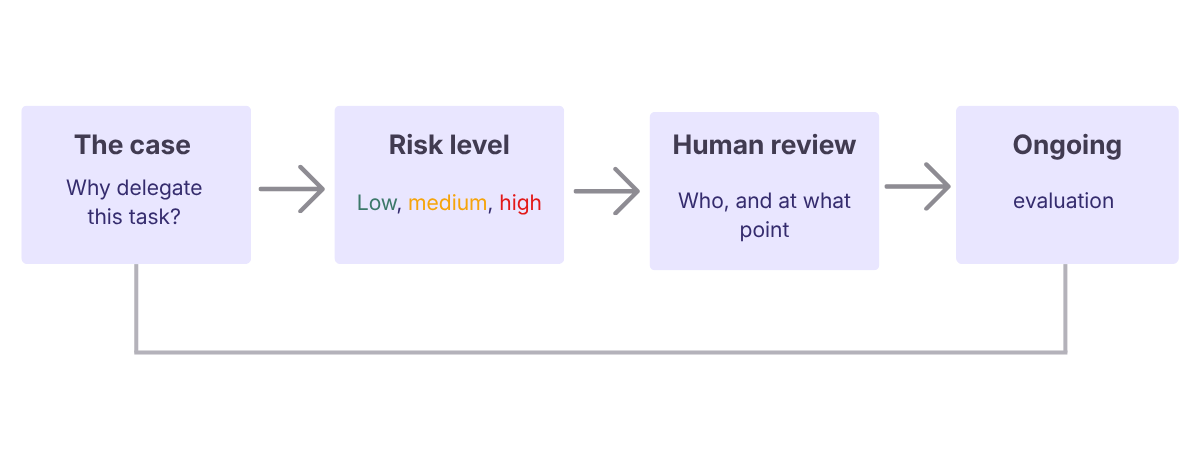
The process we apply before delegating any task to an agent includes a clear case for delegation, an assigned risk level, a defined human review step, and an ongoing evaluation cycle.
It’s an adaptable system that you can use too. We treat it as a living document rather than a fixed rulebook. The tools it governs are changing quickly, and the process needs room to change with them.
Who's involved
We’ll refer to three roles throughout this process. Depending on your organization's size, one person may hold several.
- Submitter: the person who identifies, tests, and documents a play.
- Human reviewer: whoever is designated to check a submitted play (doesn’t have to be fixed)
- Process owner: oversees the process itself and sets the cadence for review.
Step 1: Identifying & Selecting Tasks
The key is to look for tasks that are genuinely strong candidates for delegation, not just tasks that seem interesting to automate. Start by pulling ideas from across the organization. Ask teams to identify the repetitive tasks they wish they could automate.
Tip: Set up optional internal ‘hackathons’ to give staff a low-stakes space to brainstorm, practice writing prompts, and test ideas against real tasks.
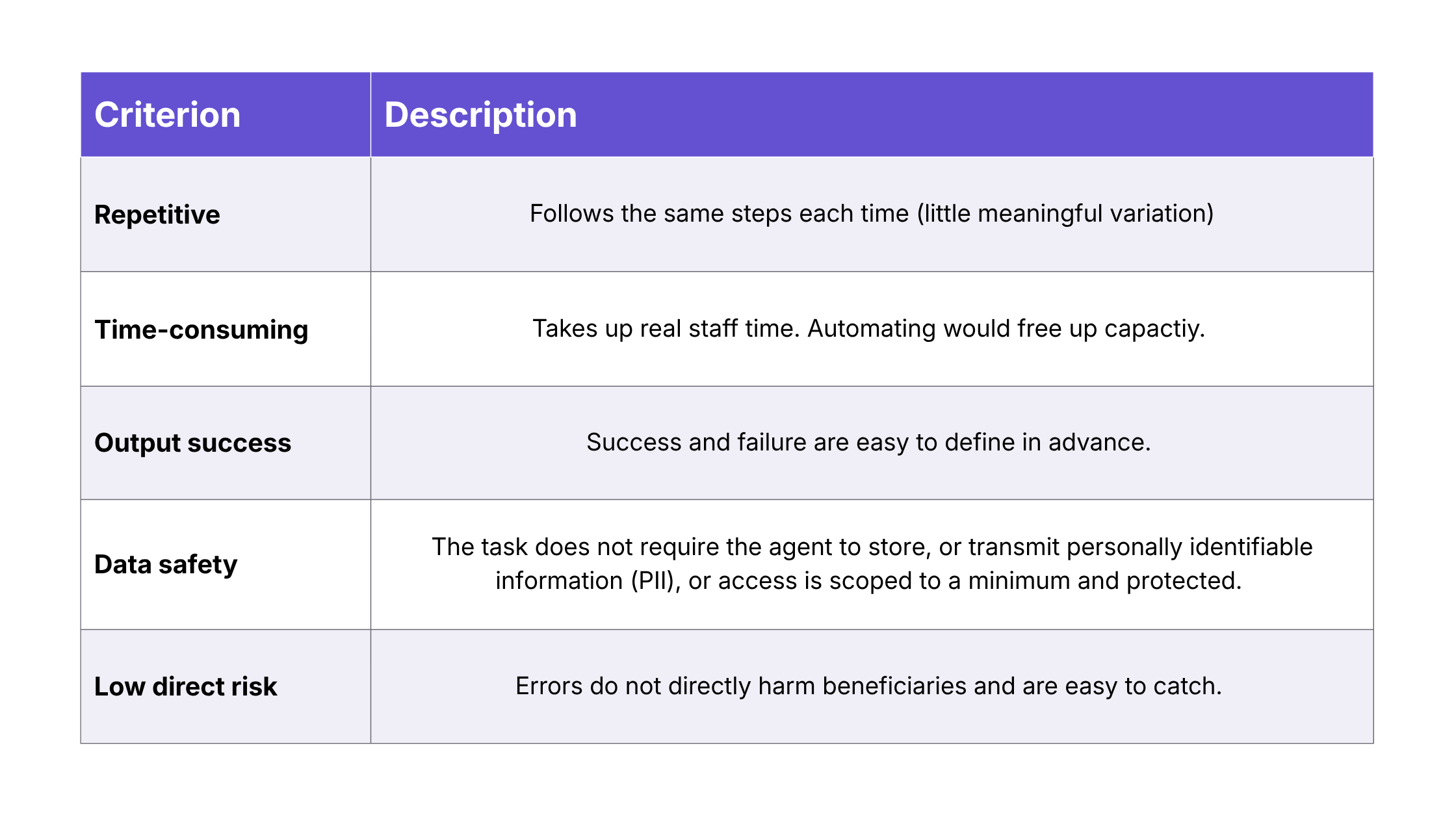
Once you have a substantial list of initial ideas, check them across these five criteria for what makes a good candidate. If a task clears the majority of these criteria, it’s worth building. The goal isn't to automate everything that can be automated. It's to free people up for meaningful work.
Step 2: Assessing Risk & Testing the Play
Step 1's fifth criterion asked whether a task carries low, reversible risk. This step goes deeper on the safety measure: once a task clears the initial criteria, the submitter should assign it a specific risk level(high/medium/low), based on this set of criteria:
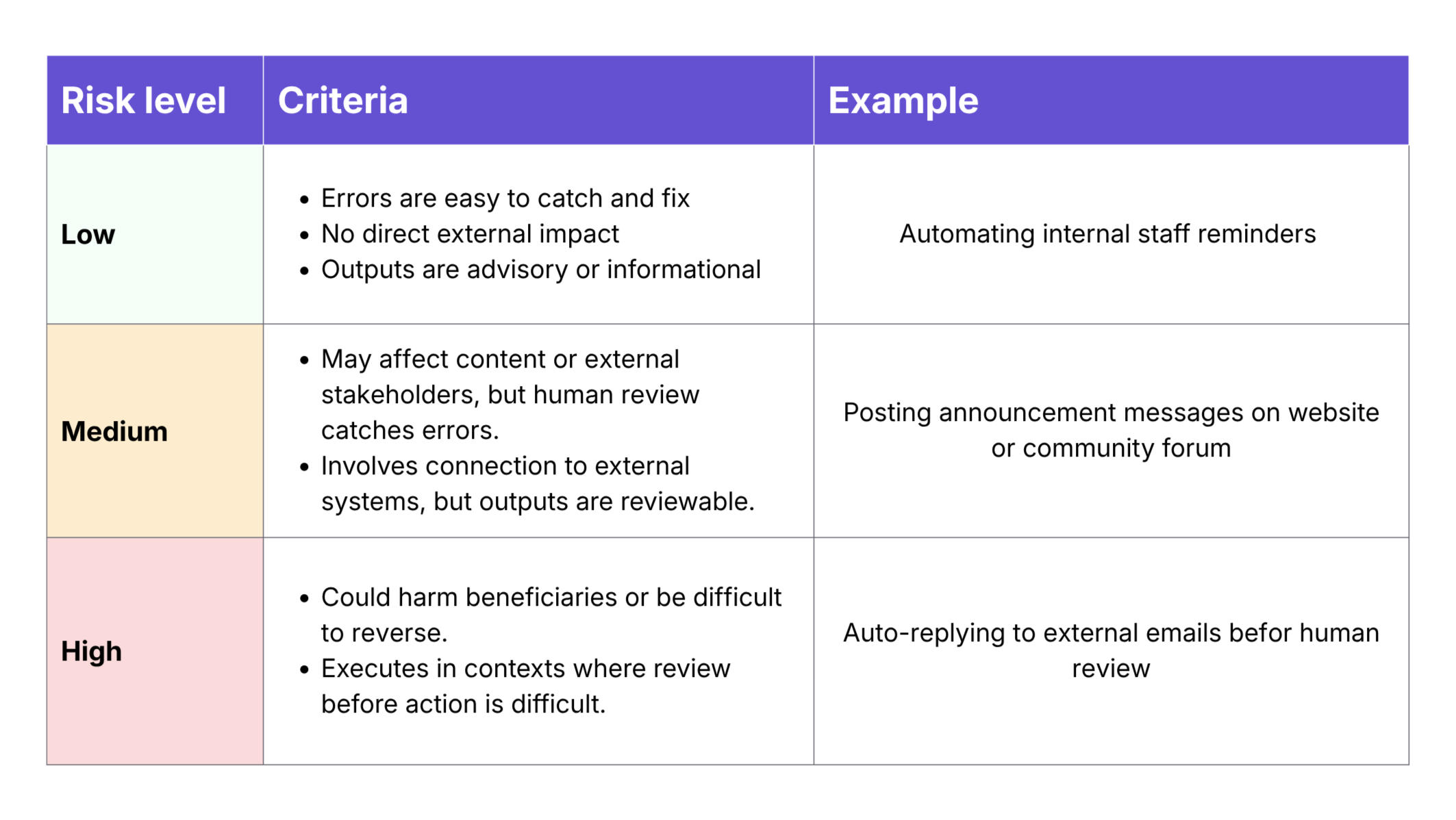
The risk classification shapes how much human oversight the play will need, how closely it gets watched once live, and how much scrutiny it gets at the human review stage.
Before officially documenting a proposed play, the submitter should build the play and run it as a test. Importantly, using placeholder data where possible is strongly recommended in testing, especially if it’s high or medium risk.
Note: Before testing plays, confirm your organization has an approved tools list: the specific AI platforms and agents staff are cleared to use (e.g. Claude, Manus, Zapier).
Step 3: Documenting and Review
After a play has been risk-classified and tested, it’s time to document it. We use a simple form in our project management system to standardize the information captured about each play and make submission accessible to any staff member.
The submission should include: 1) a description of the task & automation, 2) the tools it requires, 3) the risk level (high/med/low), 4) the actual prompt you tested in step 2, and 5) the designated human reviewer.
Once the potential play is documented, the reviewer checks four things: whether the task meets the delegation criteria from Step 1, whether the risk level is accurate, whether the human review requirement fits that risk, and whether a test run is documented. From there, the play is either approved for use, or returned to the submitter with notes.
Important Recommendation: Set limitations around what internal systems staff can connect to an agent. CareerVillage example: if a submission requires connection to Google Drive, the reviewer would either reject the submission or suggest a workaround (e.g. exporting a Google Sheet) to ensure the agent doesn’t have unfettered access to sensitive systems & data.
Step 4: Ongoing Operating & Evaluation
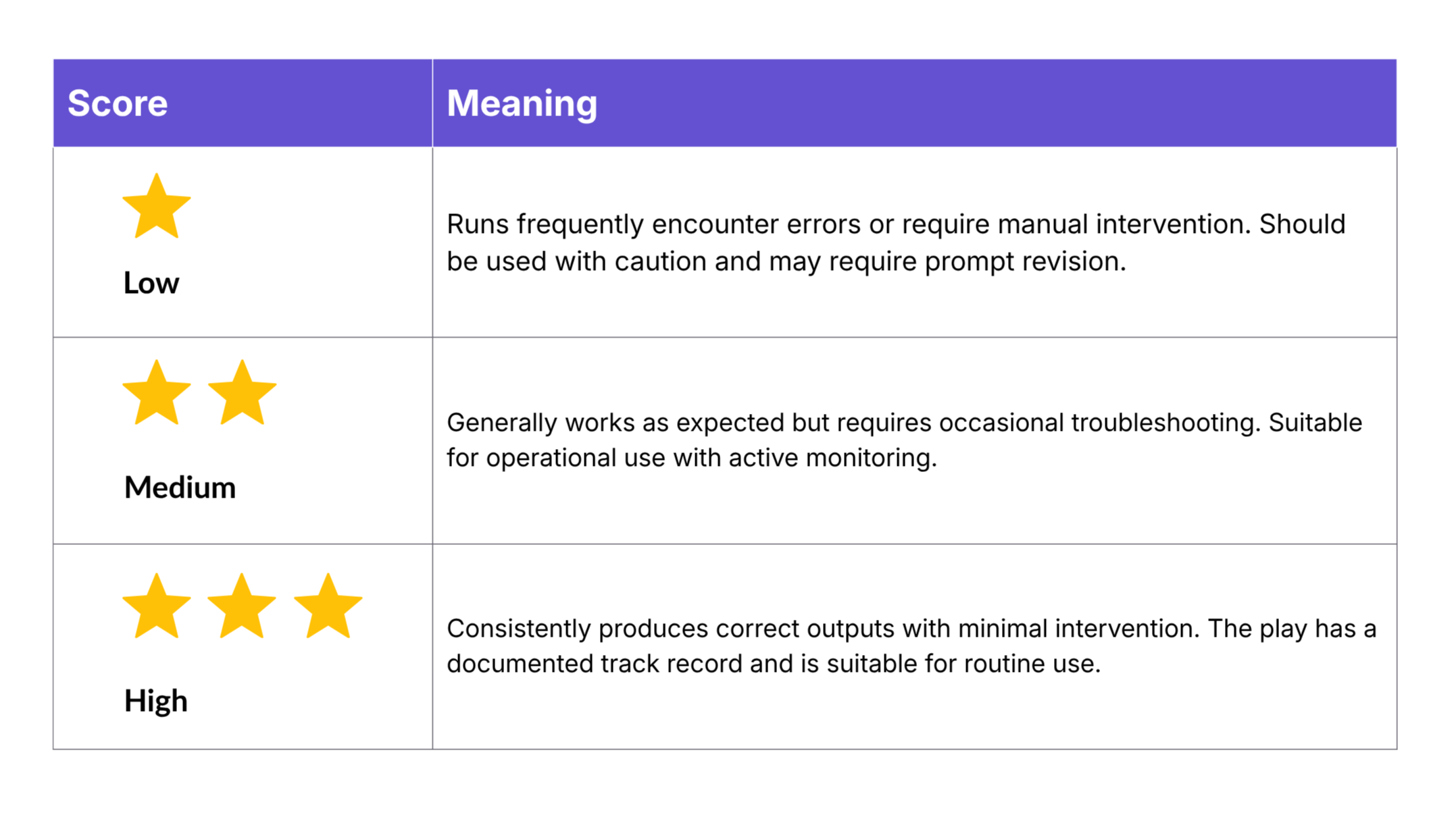
Implementing an accountable process for ongoing evaluation is a step that cannot be skipped. The approach we use for evaluation cadence is built in: whenever a staff member uses a play, they share how it went with the evaluation lead. That conversation prompts the review so the lead can update the status of two key evaluations:
- Risk: Revisit the risk evaluation criteria, and update the score if necessary
- Reliability: Each play carries a score from one to three stars:
*Note on escalation: If a play produces something harmful, inaccurate, or unexpected, the response is simple: stop the play and flag it right away. Pausing should always be understood as the safe move, never as an overreaction.
Beyond individual run logs, review a few broader indicators on a regular basis, such as quarterly:
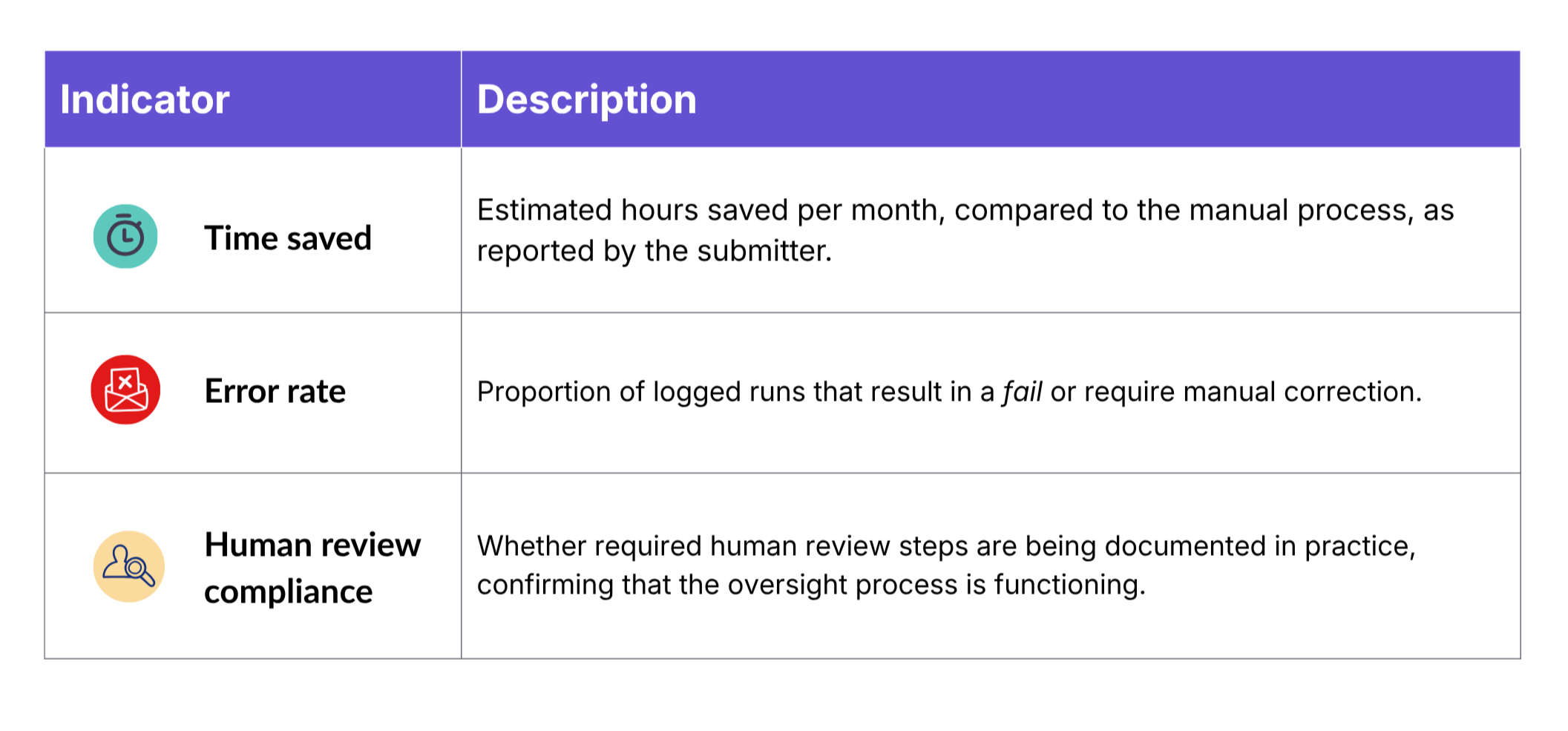
Use Case Examples
Use case 1: Synthesizing Documentation
Have you ever had a project passed off to you without a concise set of context and information to reference? Knowledge at a fast-paced organization tends to live in a lot of different places at once: meeting transcripts, Slack threads, document comments, old email chains, and half-finished notes. It works until it ends up creating extra work when a project needs to be passed off to someone new.
Agents are well-suited to this kind of synthesis work: pulling from multiple source types and organizing the result into something a person can actually act on.
Example: When our team needed to document a data migration for future engineers, the source material was scattered across voiceover transcripts, code files, written notes, and old chat logs, each with a different level of reliability. An agent was given a clear hierarchy for which sources to trust first, then synthesized everything into structured documentation, with a human reviewing the result for accuracy before it was finalized.
Use case 2: Transferring Collected Data
Collecting information and storing that information often call for different tools. The format that's easiest for a respondent (a survey, an application, a feedback form) isn't always the one your team actually works from. Transferring the information manually is often how that gap gets bridged.
Your staff’s time is too precious to spend on the task of “scan an entry, copy it, move it into the right place, repeat.” It's exactly the kind of well-defined, high-volume task agents are suited for.
Example: At our in-person volunteer events, advice for students is collected through a Google Form rather than typed directly on our platform, which makes participation far easier for volunteers. In the past, that format has cost our staff hours of manual copy-paste after each event to make sure the advice gets on the platform. Now, an agent reads the completed spreadsheet and posts each response directly to the right question, freeing up time for our team to plan the next event instead. Our moderation team, who reviews all posts after they go live, serves as an extra human in-the-loop in this case.
Use case 3: Prioritizing projects
When staff capacity is limited, there’s less time to carefully sort priorities. Agents can help standardize the process of sorting a log of to-dos and shrink the time it takes to make important prioritization decisions.
Example: Our Product team maintains a large backlog of user feedback in Asana. Reviewing, categorizing, and assigning a rationale to each item used to take real time away from actually building. Now, an agent reviews incoming feedback, sorts it against predefined impact-and-effort criteria, and assigns a due date automatically, freeing the team to focus on problem-solving instead of triage.
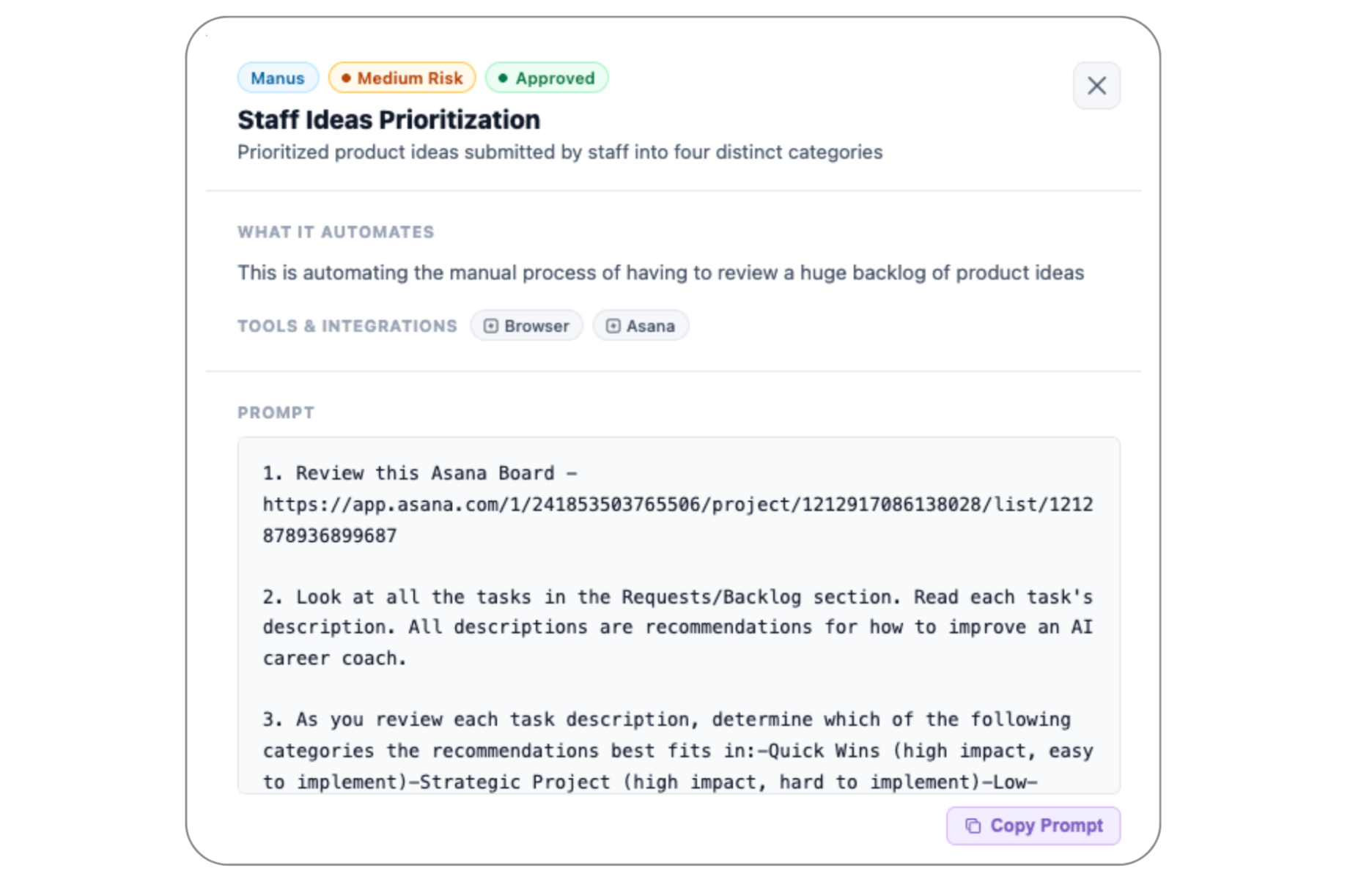
Example of a real agentic play submission from our internal log
This kind of task tends to be a strong candidate for agent delegation specifically because "good prioritization" can be defined in advance: the criteria for impact, effort, and urgency rarely change from one review cycle to the next, even if the items being sorted do.
Use case 4: Understanding Stakeholders & Beneficiaries
Every nonprofit knows the value of understanding stakeholders and beneficiaries. Sign-up logs, form responses, and outreach lists can hold real signals about who's engaging with your organization, but only if there’s time and resources to dig through them.
This is where agents are especially useful: they can move through large batches of raw data and surface patterns a person would otherwise have to find manually, one entry at a time.
Example: Our team created a play that takes a CSV of email domains and researches each one to identify the institution, org type, location, and population served. When we have batches of hundreds of new users, our team can stay on top of patterns to inform potential new institutions to work with, and types of users who are seeking career guidance on our platforms.
Important Reminder: Before feeding a list of people to an AI system, you should clean the list of any sensitive personal information.
Use case 5: Building Internal Web Tools
Small internal tools, a tracker, a dashboard, a one-off form, tend to get worked around rather than built: a shared spreadsheet standing in, an email chain doing the job instead. Agents change what's possible here. A documented need can turn directly into a working tool, without requiring a software engineer or code written by hand.
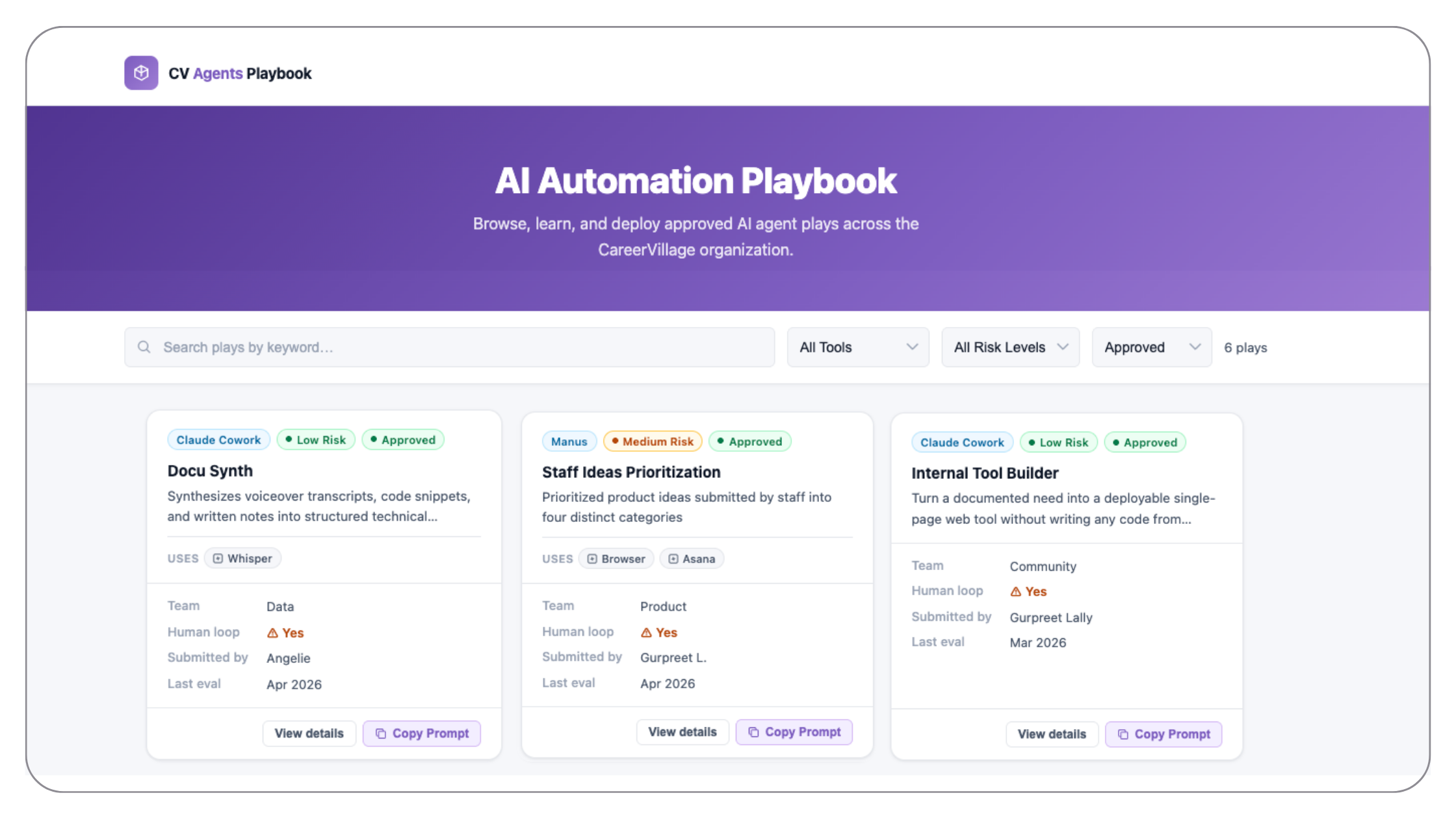
Example: We built an agent that takes a documented internal need and turns it into a deployable, single-page web tool, no code written by hand. It's a fitting close to this guide: the tool that made it possible to build and share this very registry of plays was, itself, a product of the process this guide describes.
Key Takeaways for Nonprofits
- The process matters more than the tools. Agents will keep changing, the platforms you use today may not be the ones you use next year, but a clear framework for deciding what to delegate, classifying risk, and building in human review will outlast any specific tool.
- Start with the criteria, not the excitement. It's tempting to automate whatever feels most impressive to build. Look for tasks that are repetitive, well-defined, and low-risk first, and let the use case follow from there.
- Safety and speed don’t need to be in tension. A clear risk level and a named human reviewer don't slow a play down. They're what make it possible to scale with confidence instead of hesitation.
- Approval isn't the finish line. A play that clears review still gets watched: run logs, reliability scores, a person accountable for catching it if something breaks. That ongoing accountability is key to successfully implementing agents at your organization.
From the blog
Expanding Coach: A new partnership with NextLadder Ventures
The largest investment in CareerVillage to date will put career guidance within reach of more young people.
Agentic AI for Nonprofits
Agentic AI for Nonprofits: A Guide to Safe Internal Delegation Download PDF Agentic AI for Nonprofits: A Guide to Safe Internal Delegation is a practical playbook for nonprofits that want to use AI agents for internal operations, built from how our own team does it at CareerVillage. Most nonprofits know the feeling of having more […]
Making the Most of Your Internship: Advice from CareerVillage’s Summer Interns
As CareerVillage’s first marketing intern, I help tell real stories about the humans using our products and services to explore careers and prepare for jobs. Among others, I told the story of one IT student in the Philippines who connected to the CareerVillage community for guidance on skill-building and project priorities. I told the story […]